Open CASCADE notes

A blog about the Open Source 3D modeling kernel: notes from its former developer and project manager

(Continuation of part1)
 Same approach works for surfaces. In this case GeomConvert_ApproxSurface and Adaptor3d_Surface classes should be used in exact same manner.

Below are a few examples of creating law surfaces.

The first case is an example of creating a variable offset surface, where a surface is defined as follows:
S(u,v) = B(u,v) + Offset(u,v) * N (u,v), where
B(u,v) is a basis surface,
N (u,v) is a unit normal to the basis surface,
Offset (u,v) is a function C + u ^ 2 + v ^ 2, where C is constant.

The two below examples apply such offset laws to plane and sphere respectively. The basis surface B is in red, and the resulting surface S – in green.


The other example below demonstrates surface warping, where a planar face is twisted along one of its directions:


Enjoy! :-)
Roman
Share
Tweet
Pin
Share
2 comments
A recent case with enhancing CAD Exchanger ACIS importer to broaden support of ACIS primitives inspired me to write this post.

Like other modeling kernels, Open CASCADE comes with a finite set of supported types of curves and surfaces. For instance, for curves this includes lines and conic curves (circles, ellipses, parabolas and hyperbolas), B-Splines, Bezier curves, offset curves plus explicitly trimmed curves. OCC supports parametrics definition where 3D coordinate (x,y,z) is evaluated via parameter t, for surface it is calculated from a pair (u,v).

For instance, for line it is:
C(t) = O + Dt, where O is an origin and D is a unit vector.

Thus, a line in OCC is parametrized by its length.

ACIS and Parasolid additionally support so called procedural geometries (e.g. intersection curve or rolling ball surface) when there is no explicit formula but each point is still unambiguously calculated from parameters t or (u,v).

However, a limited set of explicitly supported types does not allow to express other possible types of curves and surfaces which could be easily represented in parametric definition. For instance, there were a few questions on the OCC forum how to model a helix curve with the help of OCC.

Let us consider how you could that indeed.

Say, a helix is parametrized as follows:

X(t) = O + Rcos(u) X
Y(t) = O + Rsin(u) Y
Z(t) = O + (pitch/(2*PI) * v Z

Where {O ,X, Y, Z} is a local axis system (origin and 3 unit vectors). Pitch – is a helix step along the Z axis. See the below screenshot (taken from ACIS documentation):


Now given this explicit definition (or law) how could you map this to Open CASCADE ?

One option would be to subclass Geom_Curve and implement respective methods (D0(), D1(), ..., Continuity(), etc). That would be fine if you only need a limited time span of such an object and won’t feed it into various OCC modeling algorithms. The OCC classes ShapeExtend_ComplexCurve and _CompositeSurface follow this approach.

However, although you could create an edge on such a curve, you would not be able to save it in a .brep file right away (you would need to enable a vehicle for saving/retrieving user-defined types). Some algorithms may throw an exception on an unrecognized type and so on.

Another option is to do one time approximation with B-Spline and keep the B-Spline representation after that. You would certainly lose original definition and evaluation of a point and derivative would be times more expensive. However you could keep this representation in persistent representation and confidently use it anywhere. By the way ACIS does support helix type and combines both the original definition and its B-Spline approximation.

To approximate with B-Spline, the GeomConvert_ApproxCurve class will do the job.

GeomConvert_ApproxCurve accepts a curve adaptor which essentially implements an Adaptor design pattern and produces a B-Spline curve. You would essentially need to create a subclass of Adaptor3d_Curve and implement respective methods (D0(), D1(), Intervals(), etc). You could possibly mix this approach with the former and create GeomAdaptor_Curve which would accept your Geom_Curve subclass.

Below is an excerpt from CAD Exchanger that approximates a helix with OCC B-Spline:
/*! Uses adaptor classes and invokes GeomConvert_ApproxCurve to approximate with a B-Spline.
    Created B-Spline is polynomial and is of C2-continuity.
    Returns true if the B-Spline has been successfully created and false otherwise.
*/
bool ACISAlgo_Helix::MakeHelix (const ACISGeom_HelixData& theSource,
    Handle_Geom_BSplineCurve& theTarget)
{
    Handle_ACISAlgo_HHelixCurveAdaptor anAdaptor = new ACISAlgo_HHelixCurveAdaptor (theSource);
    Standard_Real aTol = Precision::Confusion();
    GeomAbs_Shape aContinuity = GeomAbs_C2 /*highest supported continuity*/;
    Standard_Integer aMaxSeg = 10000, /*max number of spans*/
                     aMaxDeg = 9; /*max degree, consistent with settings in Algo*/
    GeomConvert_ApproxCurve anApprox (anAdaptor, aTol,
        aContinuity,
        aMaxSeg,
        aMaxDeg);
    if (anApprox.HasResult()) {
        theTarget = anApprox.Curve();
        Base_Debugger& aDebugger = Base_Debugger::GlobalInstance();
        aDebugger.Save (theTarget, "curve");
    }
    return !theTarget.IsNull();
 }
//! Defines data elements that can be reused for both common ACIS 'helix' and ASM 'helix_int_cur'.
struct ACISGeom_HelixData
{
    ACISGeom_HelixData() :
        myXRadius(0.),
        myYRadius(0.),
        myPitch(0.),
        myTaper(0.),
        myRangeMin (0.),
        myRangeMax (2 * M_PI),
        myScaleFactor (1.)
    {}

    __CADEX_DEFINE_PROPERTY(gp_Ax3,Position) //can be right- or left-handed
    __CADEX_DEFINE_PRIMITIVE_PROPERTY(double,XRadius)
    __CADEX_DEFINE_PRIMITIVE_PROPERTY(double,YRadius)
    __CADEX_DEFINE_PRIMITIVE_PROPERTY(double,Pitch)  //must be >= 0, if = 0 then is planar
    __CADEX_DEFINE_PRIMITIVE_PROPERTY(double,Taper) //if > 0, helix widens along the Z-axis, if 0 - then lies on a cylinder
    __CADEX_DEFINE_PRIMITIVE_PROPERTY(double,RangeMin)
    __CADEX_DEFINE_PRIMITIVE_PROPERTY(double,RangeMax)
    __CADEX_DEFINE_PRIMITIVE_PROPERTY(double,ScaleFactor)
};

/*! A few methods in OCC 6.9.0 have been made const.*/
#if OCC_VERSION_HEX < 0x060900
#define __CADEX_ADAPTOR3D_CURVE_CONST
#else
#define __CADEX_ADAPTOR3D_CURVE_CONST const
#endif

/* \class ACISAlgo_HelixCurveAdaptor
   \brief Defines an adaptor to represent a helix curve.

   Helix data is defined by ACISGeom_HelixData.
   Evaluation is performed in the Evaluator subclass which can either represent a helix lying on a
   cylinder (if taper is 0) or on a cone (if taper is not 0).

   Helix can have distinct radii along X and Y axes, i.e. to have an elliptical section.
*/
class ACISAlgo_HelixCurveAdaptor : public Adaptor3d_Curve
{
public:

    class Evaluator;

    //! Constructor.
    ACISAlgo_HelixCurveAdaptor (const ACISGeom_HelixData& theData);

    //! Constructor
    ACISAlgo_HelixCurveAdaptor (const std::shared_ptr& theEvaluator,
        Standard_Real theMin,
        Standard_Real theMax);

    virtual Standard_Real FirstParameter()const __CADEX_OVERRIDE_ATTRIBUTE;
    virtual Standard_Real LastParameter() const __CADEX_OVERRIDE_ATTRIBUTE;

    virtual GeomAbs_Shape Continuity() const __CADEX_OVERRIDE_ATTRIBUTE;
    virtual Standard_Integer NbIntervals (const GeomAbs_Shape S) __CADEX_ADAPTOR3D_CURVE_CONST
        __CADEX_OVERRIDE_ATTRIBUTE;
    virtual void Intervals (TColStd_Array1OfReal& T, const GeomAbs_Shape S) __CADEX_ADAPTOR3D_CURVE_CONST
        __CADEX_OVERRIDE_ATTRIBUTE;
    virtual Handle(Adaptor3d_HCurve) Trim (const Standard_Real First,
        const Standard_Real Last,
        const Standard_Real Tol) const __CADEX_OVERRIDE_ATTRIBUTE;
  
    virtual Standard_Boolean IsClosed() const __CADEX_OVERRIDE_ATTRIBUTE;
    virtual Standard_Boolean IsPeriodic() const __CADEX_OVERRIDE_ATTRIBUTE;

    virtual gp_Pnt Value (const Standard_Real U) const __CADEX_OVERRIDE_ATTRIBUTE;
    virtual void D0 (const Standard_Real U, gp_Pnt& P) const __CADEX_OVERRIDE_ATTRIBUTE;
    virtual void D1 (const Standard_Real U, gp_Pnt& P, gp_Vec& V) const __CADEX_OVERRIDE_ATTRIBUTE;
    virtual void D2 (const Standard_Real U, gp_Pnt& P, gp_Vec& V1, gp_Vec& V2) const __CADEX_OVERRIDE_ATTRIBUTE;
    virtual void D3 (const Standard_Real U, gp_Pnt& P, gp_Vec& V1, gp_Vec& V2, gp_Vec& V3) const
        __CADEX_OVERRIDE_ATTRIBUTE;
    virtual gp_Vec DN (const Standard_Real U, const Standard_Integer N) const __CADEX_OVERRIDE_ATTRIBUTE;
    virtual Standard_Real Resolution (const Standard_Real R3d) const __CADEX_OVERRIDE_ATTRIBUTE;
    virtual GeomAbs_CurveType GetType() const __CADEX_OVERRIDE_ATTRIBUTE;

protected:
    std::shared_ptr  myEvaluator;
    Standard_Real               myMin;
    Standard_Real               myMax;
};
DEFINE_STANDARD_HANDLE(ACISAlgo_HHelixCurveAdaptor,Adaptor3d_HCurve)
class ACISAlgo_HHelixCurveAdaptor : public Adaptor3d_HCurve
{
public:

    //! Constructor.
    ACISAlgo_HHelixCurveAdaptor (const ACISGeom_HelixData& theData) : myAdaptor (theData) {}

    //! Constructor.
    ACISAlgo_HHelixCurveAdaptor (const std::shared_ptr& theEvaluator,
        Standard_Real theMin,
        Standard_Real theMax) : myAdaptor (theEvaluator, theMin, theMax) {}

    //! Returns the adaptor as Adaptor3d_Curve.
    /*! Return the internal ACISAlgo_HelixCurveAdaptor object.*/
    virtual const Adaptor3d_Curve& Curve() const __CADEX_OVERRIDE_ATTRIBUTE { return myAdaptor; }

    //! Returns the adaptor as Adaptor3d_Curve.
    /*! Return the internal ACISAlgo_HelixCurveAdaptor object.*/
    virtual Adaptor3d_Curve& GetCurve() __CADEX_OVERRIDE_ATTRIBUTE  { return myAdaptor; }
  
public:
    DEFINE_STANDARD_RTTI(ACISAlgo_HelixCurveAdaptor)

protected:
    ACISAlgo_HelixCurveAdaptor  myAdaptor;
};

__CADEX_IMPLEMENT_HANDLE(ACISAlgo_HHelixCurveAdaptor,Adaptor3d_HCurve)
/*********************************************************************************************/


/*! \class ACISAlgo_HelixCurveAdaptor::Evaluator
    \brief Base abstract class to evaluate helix.
*/
class ACISAlgo_HelixCurveAdaptor::Evaluator
{
public:
    __CADEX_DEFINE_MEMORY_MANAGEMENT

    Evaluator (const ACISGeom_HelixData& theData) : myData (theData), myVCoef (1.) {}
    virtual ~Evaluator() {}

    const ACISGeom_HelixData& Data() const { return myData; }

    double VParameter (Standard_Real U) const { return U * myVCoef; }
    virtual void D0 (Standard_Real U, gp_Pnt& P) const = 0;
    virtual void D1 (Standard_Real U, gp_Pnt& P, gp_Vec& V) const = 0;
    virtual void D2 (Standard_Real U, gp_Pnt& P, gp_Vec& V1, gp_Vec& V2) const = 0;
    virtual void D3 (Standard_Real U, gp_Pnt& P, gp_Vec& V1, gp_Vec& V2, gp_Vec& V3) const = 0;
    virtual gp_Vec DN (Standard_Real U, Standard_Integer N) const = 0;

protected:
    const gp_XYZ& Loc()  const { return myData.Position().Location().XYZ(); }
    const gp_XYZ& XDir() const { return myData.Position().XDirection().XYZ(); }
    const gp_XYZ& YDir() const { return myData.Position().YDirection().XYZ(); }
    const gp_XYZ& ZDir() const { return myData.Position().Direction().XYZ(); }

    ACISGeom_HelixData  myData;
    double              myVCoef; //coefficient to multiply U to get a V parameter on a respective surface
};
/*! \class ACISAlgo_HelixCurveAdaptor_CylinderEvaluator
    \brief Evaluates a helix lying on a cylinder.
*/
class ACISAlgo_HelixCurveAdaptor_CylinderEvaluator : public ACISAlgo_HelixCurveAdaptor::Evaluator
{
public:
    ACISAlgo_HelixCurveAdaptor_CylinderEvaluator (const ACISGeom_HelixData& theData);
    virtual void D0 (Standard_Real U, gp_Pnt& P) const __CADEX_OVERRIDE_ATTRIBUTE;
    virtual void D1 (Standard_Real U, gp_Pnt& P, gp_Vec& V) const __CADEX_OVERRIDE_ATTRIBUTE;
    virtual void D2 (Standard_Real U, gp_Pnt& P, gp_Vec& V1, gp_Vec& V2) const __CADEX_OVERRIDE_ATTRIBUTE;
    virtual void D3 (Standard_Real U, gp_Pnt& P, gp_Vec& V1, gp_Vec& V2, gp_Vec& V3) const __CADEX_OVERRIDE_ATTRIBUTE;
    virtual gp_Vec DN (Standard_Real U, Standard_Integer N) const __CADEX_OVERRIDE_ATTRIBUTE;
};

ACISAlgo_HelixCurveAdaptor_CylinderEvaluator::ACISAlgo_HelixCurveAdaptor_CylinderEvaluator (
    const ACISGeom_HelixData& theData) :
    ACISAlgo_HelixCurveAdaptor::Evaluator (theData)
{
    myVCoef = theData.Pitch() * theData.ScaleFactor() / (2 * M_PI);
}


void ACISAlgo_HelixCurveAdaptor_CylinderEvaluator::D0 (Standard_Real U,
    gp_Pnt& P) const
{
    Standard_Real v    = VParameter (U);
    Standard_Real Rx   = myData.XRadius();
    Standard_Real Ry   = myData.YRadius();
    Standard_Real sinU = sin (U);
    Standard_Real cosU = cos (U);
    P = Rx * cosU * XDir() + Ry * sinU * YDir() + v * ZDir() + Loc();
}

void ACISAlgo_HelixCurveAdaptor_CylinderEvaluator::D1 (
    Standard_Real U,
    gp_Pnt& P,
    gp_Vec& V) const
{
    Standard_Real v    = VParameter (U);
    Standard_Real Rx   = myData.XRadius();
    Standard_Real Ry   = myData.YRadius();
    Standard_Real sinU = sin (U);
    Standard_Real cosU = cos (U);
    P = Rx * cosU * XDir() + Ry * sinU * YDir() + v * ZDir() + Loc();

    Standard_Real k    = myVCoef;
    V = -Rx * sinU * XDir() + Ry * cosU * YDir() + k * ZDir();
}

void ACISAlgo_HelixCurveAdaptor_CylinderEvaluator::D2 (
    Standard_Real U,
    gp_Pnt& P,
    gp_Vec& V1,
    gp_Vec& V2) const
{
    Standard_Real v    = VParameter (U);
    Standard_Real Rx   = myData.XRadius();
    Standard_Real Ry   = myData.YRadius();
    Standard_Real sinU = sin (U);
    Standard_Real cosU = cos (U);
    P = Rx * cosU * XDir() + Ry * sinU * YDir() + v * ZDir() + Loc();

    Standard_Real k    = myVCoef;
    V1 = -Rx * sinU * XDir() + Ry * cosU * YDir() + k * ZDir();
    V2 = -Rx * cosU * XDir() - Ry * sinU * YDir();
}
/*********************************************************************************************/

ACISAlgo_HelixCurveAdaptor::ACISAlgo_HelixCurveAdaptor (const ACISGeom_HelixData& theData) :
    myMin (theData.RangeMin()),
    myMax (theData.RangeMax())
{
    if (std::fabs (theData.Taper()) < Precision::Confusion()) { //cylinder
        myEvaluator.reset (new ACISAlgo_HelixCurveAdaptor_CylinderEvaluator (theData));

    } else { //cone
        myEvaluator.reset (new ACISAlgo_HelixCurveAdaptor_ConeEvaluator (theData));
    }
}

/*! Used when trimming*/
ACISAlgo_HelixCurveAdaptor::ACISAlgo_HelixCurveAdaptor (const std::shared_ptr& theEvaluator,
    Standard_Real theMin,
    Standard_Real theMax) :
    myEvaluator (theEvaluator),
    myMin (theMin),
    myMax (theMax)
{
    __CADEX_ASSERT_INVALID_VALUE(myEvaluator->Data().RangeMin() <= theMin);
    __CADEX_ASSERT_INVALID_VALUE(myEvaluator->Data().RangeMax() >= theMax);
}

Standard_Real ACISAlgo_HelixCurveAdaptor::FirstParameter() const
{
    return myMin;
}

Standard_Real ACISAlgo_HelixCurveAdaptor::LastParameter() const
{
    return myMax;
}

GeomAbs_Shape ACISAlgo_HelixCurveAdaptor::Continuity() const
{
    return GeomAbs_CN;
}

Standard_Integer ACISAlgo_HelixCurveAdaptor::NbIntervals (const GeomAbs_Shape /*S*/) __CADEX_ADAPTOR3D_CURVE_CONST
{
    return 1;
}

void ACISAlgo_HelixCurveAdaptor::Intervals (TColStd_Array1OfReal& T, const GeomAbs_Shape /*S*/) __CADEX_ADAPTOR3D_CURVE_CONST
{
    T (T.Lower()) = FirstParameter();
    T (T.Upper()) = LastParameter();
}

Handle(Adaptor3d_HCurve) ACISAlgo_HelixCurveAdaptor::Trim (const Standard_Real First,
    const Standard_Real Last,
    const Standard_Real /*Tol*/) const
{
    return new ACISAlgo_HHelixCurveAdaptor (myEvaluator, First, Last);
}

Standard_Boolean ACISAlgo_HelixCurveAdaptor::IsClosed() const
{
    return Standard_False;
}

Standard_Boolean ACISAlgo_HelixCurveAdaptor::IsPeriodic() const
{
    return Standard_False;
}

gp_Pnt ACISAlgo_HelixCurveAdaptor::Value (const Standard_Real U) const
{
    gp_Pnt aP;
    D0 (U, aP);
    return aP;
}

void ACISAlgo_HelixCurveAdaptor::D0 (const Standard_Real U, gp_Pnt& P) const
{
    myEvaluator->D0 (U, P);
}

void ACISAlgo_HelixCurveAdaptor::D1 (const Standard_Real U, gp_Pnt& P, gp_Vec& V) const
{
    myEvaluator->D1 (U, P, V);
}

void ACISAlgo_HelixCurveAdaptor::D2 (const Standard_Real U, gp_Pnt& P, gp_Vec& V1, gp_Vec& V2) const
{
    myEvaluator->D2 (U, P, V1, V2);
}


Standard_Real ACISAlgo_HelixCurveAdaptor::Resolution (const Standard_Real R3d) const
{
    //see GeomAdaptor_Curve::Resolution()
    const auto& aData = myEvaluator->Data();
    Standard_Real R = std::max (aData.XRadius(), aData.YRadius());
    if (R3d < 2 * R)
        return 2 * ASin (R3d / (2 * R));
    else
        return 2 * M_PI;
}

GeomAbs_CurveType ACISAlgo_HelixCurveAdaptor::GetType() const
{
    return GeomAbs_OtherCurve;
}


Below are two screenshot of approximated helices in DRAW – the first one has different Rx and Ry radii and is lying on a cylindrical surface, the second is of equal Rx and Ry radii lying on a conical surface.


Hope this post will give you some hints on how to approximate arbitrary curves and surfaces using B-Spline approximation techniques.

If you have any interesting examples to share that would certainly be good to know.

Thanks,
Roman

 
Share
Tweet
Pin
Share
No comments
Last year I mentored an Intel Summer school project which was dedicated to demonstrating vectorization parallelism with the help of Intel C/C++ compiler. We chose Open CASCADE and its NURBS surface evaluation algorithms as a target.

The outcome was quite nice - up to 16x speedup of the kernel computational functions. If you are interested, feel free to have a look at the paper published at Intel Developer Zone here - https://software.intel.com/en-us/articles/applying-vectorization-techniques-for-b-spline-surface-evaluation.

Share
Tweet
Pin
Share
1 comments
(This post was written 2+ months ago but got stuck in my drafts folder. Sorry for that)

The Nokia's once famous motto 'Connecting people' has probably gone forever (especially given recent acquisition by Microsoft), but let us grab its idea. This post will be about a nice 'connecting' concept offered by the AIS (Application Interactive Services) package, part of the visualization mechanism of Open CASCADE. Unfortunately, like many other gems scattered across the product, this one sits virtually undocumented and therefore its powerful features are significantly underutilized in OCC-based apps.

This is about AIS_ConnectedInteractive and AIS_MultipleConnected, which allows you to construct derived visual representations from already computed (or to be computed) ones. Imagine an assembly consisting of various sub-assemblies, which in their turn may consist of further sub-assemblies, and so on. Eventually each sub-assembly is broken down into part(s). Each part or sub-assembly are 'instantiated' in a parent assembly, where an instance is a reference to a referred part or assembly plus an attached transformation. Here is an example of an assembly (from STEP test suite as1*.stp):
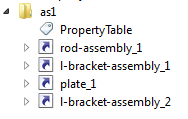
The next image is an assembly tree where you can see instances of various sub-assemblies.
Then also goes a sub-assembly l-bracket-assembly consisting of instance of a part named l_bracket and 3 instances of nut-bolt-assembly (each with different transformation), where each is a combination of two instantiated parts (bolt and nut).
AIS_ConnectedInteractive and AIS_MultipleConnected offer efficient way to compute visual representations of such complex assemblies.

AIS_ConnectedInteractive
AIS_ConnectedInteractive essentially implements the proxy pattern (or alike) and contains a reference to another AIS_InteractiveObject and transformation matrix.

Handle_AIS_InteractiveObject aRefObject =
 CreateRepresentation (...); TopLoc_Location aLoc = ...; Handle_AIS_ConnectedInteractive anInstance =  new AIS_ConnectedInteractive; anInstance->Connect (theObject, aLoc);

Note that you don't need to know details of aRefObject representation, you just attach it to anInstance.
Thus, AIS_ConnectedInteractive is well suited to create visual representation of an instance in the assembly hierarchy.

AIS_MultipleConnected
AIS_MultipleConnected follows the composite pattern and allows to combine multiple representations into one. Therefore it is an efficient way to construct visual representation of the (sub-)assembly.

Handle_AIS_MultipleConnectedInteractive anAssebly =
 new AIS_MultipleConnectedInteractive; anAssebly->Connect (aChild1); anAssebly->Connect (aChild2);
...

Again, this allows to abstract from internal details of each child object.

I use the above approach to construct visual representations of objects in a new data model designed in CAD Exchanger (currently planned to be made part of public API in version 3.0), and so far it works great.

To further abstract the creation of a final representation of the root object (or any interim one selected in a tree browser), there is a factory method that returns a handle to an object of the base type AIS_InteractiveObject.

Handle_AIS_InteractiveObject anObject =
 ModelPrs_InteractiveObjectFactory::Create (...);

Thus, the callers do not know the real type of the object that will be created – it can be either AIS_MultipleConnected, or AIS_ ConnectedInteractive, or AIS_Shape, or any other subclass of AIS_InteractiveObject.

The key benefits of *Connected* are in reusing representations of referred objects, instead of recomputing them. This allows to:
  • Reduce computation time (as creation of part representations takes the greatest time)
  • Reduce memory footprint (you do not have to create extra objects supporting the representations)
  • Reduce code size (you do not have to design extra classes for composite objects, only parts representations are really necessary)
  • Achieve greater flexibility and abstract approach (internal implementation details of referred objects are hidden and can change independently from instances and assemblies) 

To have a quick test, you might want to try DRAWEXE:
pload ALL
wedge w 1 2 3 0.5
vinit
vdisplay w
vconnect iw -5 0 0 1 0 0 0 0 1 w #creates AIS_ConnectedInteractive of AIS_Shape
box b 2 0 0 3 1 2
vconnect a -5 0 0 1 0 0 0 0 1 w b #creates AIS_ConnectedInteractive of AIS_MultipleConnected

At last, some limitations to be aware of:
  • The referred objects must belong to the same AIS_InteractiveContext. This is unfortunate but is not specific to *Connected*.
  • Setting attributes to a referred object (e.g. part) affects the referring representation (which is sort of expected). Setting an attribute to a referring object seems to have no effect.
  • Some glitches with selection (as reproduced in DRAW). 

Currently these are not affecting CAD Exchanger development, so I did not investigate these in greater details.

Anyway, hopefully these hints will be helpful for those dealing with complex data structures and GUI. If you already worked with the *Connected* and have some experience to share, it would be great to hear your comments.

Thanks!
Share
Tweet
Pin
Share
10 comments
This is a heads-up for those who deal with OCAF documents and migrating to 6.6.0.

Issue: You may observe sporadic crashes especially when dealing with AIS_InteractiveContext and/or XDE documents.

Root-cause: The root-cause of the issues is side effects of the fix #23523. It has changed the order of destruction of the document contents.
In 6.5.4 and earlier, the destructor of TDocStd_Document let the TDF_Data destructor be called what caused the following order:
- the attributes got destructed in the reversed order in the tree (i.e. first destructed were the attributes at the deepest label 0:x1:x2:...:xn, last - at root label 0:)
- the attributes got destructed while still attached to their labels (i.e. Label() in destructor still returned a valid label)

With 6.6.0 the TDocStd_Document destructor explicitly calls TDocStd_Document::Destroy() which does the opposite:
- it calls TDF_Label::ForgetAllAttributes() which removes the attributes in the direct order, from the root to the deepest label
- it first detaches the attributes' label prior to nullifying the attribute, so Label() in destructor will now always return 0.

This new behavior has at least two side effects that affected my case:
1. If the OCAF document has an attached AIS_InteractiveContext, then a crash happens upon document destruction. The root-cause is that TPrsStd_AISViewer attached to a root label contains a handle of AIS_InteractiveContext and TPrsStd_AISPresentations (at sub-labels) contain AIS_InteractiveObject's. Each of the latter has a *pointer* (not a handle, to avoid circular dependencies) to that AIS_IC context. Now when the document is destroyed in a direct order, then AIS_IC gets destroyed first (as part of TPrsStd_AISViewer destruction). So all pointers in AIS_IO's become dangling. Then during destruction of TPrsStd_AISPresentations, the method AISErase() access those dangling pointers, leading to a crash.

The same will happen in similar cases, when you have a resource on "top" labels pointed to from the "deeper" labels.
The work-around for the AISViewer was to ensure another handle to AIS_IC outside of the document which would keep the object (i.e. refcount > 0) while the document gets destroyed.

2. In XDE, XCAFDoc_DocumentTool maintains a global map storing labels containing this attribute. This design already had a flaw and at some point I had addressed it with fix 23593. That time I made a note that a better fix would get rid of a global map.
With 6.6.0 behavior XCAFDoc_DocumentTool::Destroy() is no longer effective - as explained above, upon destruction the label is already null, so the global map keeps on containing orphan labels. Depending on memory allocation, a similar label node address can be created and an access to a map would incorrectly retrieve a mapped value for that label, leading to a crash.
The new fix (24007) resolves this by getting rid of global map and keeping self-contained XDE document.  It now just stores a reference (tree-node attribute) to uniquely find a document tool label  inside the document. The fix works fine for the documents stored with older versions of XDE.

Take-aways:
1. You currently cannot rely on the order in which the document gets destroyed.
2. You should avoid accessing the resources stored at other labels during attributes destruction. Perhaps for some cases, this would require tweaks outside the OCAF doc (like in the case of AIS_IO described above).
3. Deallocation of resources by attributes should not happen in their destructors. Instead this should be done in a redefined method TDF_Label::BeforeRemoval(). So, the first implementation of 23953 was suboptimial anyway.

Recommendations/requests to OCC:
1. My personal point is that previous "bottom-up" destruction order is more practical than current "top-down". Like in C++, destruction order should be opposite to creation one, and in most applications you populate the document from top to bottom.
2. I believe OCAF must document and maintain a guarantee of the destruction policy, so that the user's applications can rely on this guarantee. Is this something OCC team can plan to address ?

Thank you in advance,
Roman
Share
Tweet
Pin
Share
5 comments
The great convenience of standard collections for a developer is that they free him/her from extra efforts on managing underlying memory allocations.
It’s so much convenient to just write
{
    std::vector v(n);
    for (int i = 0; i < n; ++i)
        v[i] = i;
}

or likewise for OCC fixed size array:
{
    TColStd_Array1OfReal a (0, n-1);
    for (int i = 0; i < n; ++i)
        v(i) = sqrt (i);
}

and be done. Who cares where the memory gets allocated for underlying elements ? Not a big deal, right ?

Well, it can become a big deal if you have to work with multiple allocations/deallocations which become the hotspots.

I was recently improving thread-safety of a few core Open CASCADE algorithms: approximation, intersection, etc (see #23952) and observed an interesting pattern that motivated posting this blog.

Some OCC developer(s) realized in the past that memory allocations can be expensive in hot cycles and worked around this by using allocation in static memory. Excerpt from ApproxInt_ImpPrmSvSurfaces::Compute() (ApproxInt_ImpPrmSvSurfaces.gxx):

static math_Vector BornInf(1,2),BornSup(1,2),F(1,1),
  X(1,2), Tolerance(1,2);
static math_Matrix D(1, 1, 1, 2);


This would result in a single allocation (upon first entry into this function) which would stay until the program termination.

Obviously that does not work in multi-threaded environment. This would create data races – as two or more threads concurrently calling the same method – and results would be unpredictable (wrong and/or unstable results, sporadic crashes, etc).

Substituting with local variables
math_Vector BornInf(1,2),BornSup(1,2),F(1,1),
  X(1,2),Tolerance(1,2);
math_Matrix D(1, 1, 1, 2);


would resolve the reentrancy problem but would create another one – continuous memory allocation/deallocation would undermine performance as each constructor and destructor would call new[] and delete[] operators.

The good news is that Open CASCADE provides constructors for math_* and TCollection_Array* classes that accept an extra parameter – an address of allocated memory. In this case they simply reuse that memory and only provide access to it. Neither do they attempt to free it upon own destruction. This provides a possibility to allocate data on stack (which has essentially zero performance cost) and make respective objects use it, preserving source compatibility with the rest of the code.

Here is a fix that uses that:
  Standard_Real aBornInf[2],aBornSup[2],aF[1],aX[2],
    aTolerance[2];
  math_Vector BornInf(aBornInf,1,2),BornSup(aBornSup,1,2),
    F(aF,1,1), X(aX,1,2),Tolerance(aTolerance,1,2);
  Standard_Real aD[1][2];
  math_Matrix D(aD,1, 1, 1, 2);  


You might want to take advantage of this simple technique whenever dealing with small objects and knowing the required sizes in advance.
Share
Tweet
Pin
Share
1 comments
(continued)

Having reviewed available NCollection allocators, we can create a C++ standard compliant allocator that would wrap them.

Please have a look at the NCollection_StdAllocator.hxx which is available in the git repository, branch CR23569. Here is a corresponding tracker report.

You can feed it with any instance of NCollection_BaseAllocator and then provide it to any STL container, for instance:

    Handle(NCollection_IncAllocator) anIncAlloc = new NCollection_IncAllocator;
    NCollection_StdAllocator aSAlloc (anIncAlloc);
    std::list > aL (aSAlloc);
    TopoDS_Solid aSolid = BRepPrimAPI_MakeBox (10., 20., 30.);
    aL.push_back (aSolid);

Default constructor uses NCollection_BaseAllocator::CommonBaseAllocator() and thus redirects all allocation calls to Open CASCADE central allocator interface. The following will do exactly this:
    std::list > aL2;

This makes NCollection_StdAllocator a superset of Standard_StdAllocator suggested in Part1 and thus self-sufficient.

Moreover, as allocators for one object type can be casted to another type (part of the C++ standard requirement), you might end up using a single type:

typedef NCollection_StdAllocator AllocatorType;

AllocatorType anAlloc (new NCollection_IncAllocator);
std::list aL3 (anAlloc);
std::vector aV (anAlloc);

and also:
typedef std::basic_string, AllocatorType> StringType;
StringType aS1; //defaults to central allocator interface
StringType aS2 (anAlloc); //uses pool allocator
StringType aS3 (AllocatorType (NCollection_HeapAllocator::GlobalHeapAllocator())); //directly uses OS allocator and is effectively equivalent to std::string


Now, with NCollection_StdAllocator you can take advantage of available Open CASCADE allocators and use STL, Boost or any other containers or template classes that accept standard allocator. By the way, this flexibility enabled me to start gradually moving from NCollection to Boost, but that's a subject for a separate post ;-)...
Share
Tweet
Pin
Share
1 comments
The previous post has introduced a C++ standard compliant allocator that wraps Open CASCADE allocator interface (Standard::Allocate(), ::Free(), ::Reallocate()) and thus can be used in any containers or other template classes that accept such allocator.

Before we move forward to consider another use case of standard allocator, let's make a step aside and review another allocator flavors offered by Open CASCADE.

Those of you who happened to use templates from NCollection or just attentively read the source code employing it might notice NCollection_BaseAllocator base class. NCollection containers sort of tried to mimic interfaces of STL containers and as such introduced allocator in its inception in early 2000es. However, unlike STL where allocator is part of the type (e.g. std::list is a different type than std::list) NCollection allows to dynamically supply an allocator, for instance:

NCollection_List aVec1, aVec2 (new NCollection_IncAllocator);

There are three types of allocator in NCollection:
-    NCollection_BaseAllocator, which is a base class that also implements a wrapper over Standard::Allocate() and ::Free(). There is a singletone returned by NCollection_BaseAllocator::CommonBaseAllocator().
-    NCollection_HeapAllocator, which wraps standard OS allocator (malloc/free). Similar to a base class there is a singletone returned by NCollection_HeapAllocator::GlobalHeapAllocator().
-    NCollection_IncAllocator, which implements a pool allocator.

The former two are straightforward and probably only NCollection_IncAllocator deserves some details.

Pool allocators (see for instance Wikipedia) are most helpful to manage temporary objects, especially when their destruction can be deferred to some common point in time, e.g. completion of an algorithm that created them. Implementation of a pool allocator is very straightforward – it preallocates a large chunk of memory (e.g. from a system heap or another allocator), and whenever there is a new temporary object to be allocated, just takes a required size from that large chunk's head pointer and shifts that pointer. Deallocation is void, i.e. no memory gets really freed after the object destructor has been called. Real deallocation of large chunk(s) happens upon own pool allocator destruction.

This simple implementation allows to greatly improve performance when dealing with numerous temporary objects due to avoiding fragmentation and/or complicated techniques to manage individual smaller memory chunks.

Here is a usage example which creates a temporary hash table:
class PartnerShapeHasher
{
public:
    static Standard_Integer HashCode (const TopoDS_Shape& theKey, const Standard_Integer theUpper)
    {
        return ::HashCode (theKey.TShape(), theUpper);
    }
    static Standard_Boolean IsEqual(const TopoDS_Shape& theKey1, const TopoDS_Shape& theKey2)
    {
        return theKey1.IsPartner (theKey2);
    }
};

//! Returns a number of partner subshapes of a given type
/*! A partner shape is a shared instance regardless of a location (transformation matrix).*/
static size_t NumberOfPartnerSubshapes (const TopoDS_Shape& theShape, const TopAbs_ShapeEnum theType)
{
    NCollection_Map aMap (1 /*default number of buckets*/, new NCollection_IncAllocator);
    for (TopExp_Explorer anExp (theShape, theType); anExp.More(); anExp.Next()) {
        const TopoDS_Shape& aSubshape = anExp.Current();
        aMap.Add (aSubshape);
    }
    return aMap.Size();
}

If your temporary objects' life span is not necessarily aligned with the end of the algorithm scope (e.g. some objects are destroyed earlier) then you could either have a separate pool allocator for such objects or just accept a trade-off of temporary larger peak memory footprint.

NCollection_IncAllocator's constructor accepts a parameter theBlockSize which specifies a size of large memory chunk(s) preallocated from the heap. I ended up with having a few predefined sizes via the following enumeration:

enum NCollection_IncAllocator_Size {
    NCollection_IncAllocator_Tiny = 1000,
    NCollection_IncAllocator_Small = 4000,
    NCollection_IncAllocator_Medium = 8000,
    NCollection_IncAllocator_Large = 16000,
    NCollection_IncAllocator_Huge = 32000
};

and use respective value depending on the most probable case, e.g.:
Handle(NCollection_BaseAllocator) anAlloc = new NCollection_IncAllocator (NCollection_IncAllocator_Tiny);
NCollection_List aList (anAlloc);

This should help avoid extra fragmentatoin in the OS allocator due to reuse of the same size blocks over and over again, yet providing a hint instead of default constructor parameter (around 26K).

If the allocator is requested to allocate an object of a larger size than the constructor's theBlockSize parameter then a new larger chunk is allocated. Whenever a new large chunk is allocated then the remaining unused free bytes in a previous chunk are wasted. So some attention should be made to minimize unnecessary waste, if it can be substantial.

Another point to remember is that NCollection_IncAllocator is not thread-safe (though reentrant), so access to the same instance should be synchronized outside, if it is used from multiple threads. For thread-safe scalable implementations you might want to check Intel Threading Building Blocks memory pools.

Now with the review of NCollection allocator completed, let's get back to the standard interface.
Share
Tweet
Pin
Share
No comments
As you know, Open CASCADE has its own memory allocation mechanism, which entry points are Standard::Allocate() and Standard::Free(). They forward (de-)allocation requests to a current memory manager, which can either be a). default system allocator (if environment variable MMGT_OPT=0), b). own Open CASCADE's (MMGT_OPT=1), or c). Intel TBB (MMGT_OPT=2).

Most Open CASCADE classes (e.g. all which are defined in .cdl files) redefine operators new and delete to use Standard::Allocate() and Standard::Free() respectively – look at any .hxx file.

Using common memory allocation mechanism allows to decrease memory footprint and/or increase performance, especially when using TBB allocator (in multi-threaded apps). However, you may easily miss this advantage in your application in the following typical cases:
1. You dynamically allocate objects of your classes and their new/delete operators do not use Standard::Allocate()/::Free().
2. You use standard containers (std::vector, std::map, std::list,...).
#1 is easily addressed by redefining new/delete operators in your base class(es) in a way similar to OCC.
#2 is more tough, as standard collections by default use standard allocator (std::allocator<T>). So all auxiliary elements (e.g. list nodes) are allocated outside of OCC-governed memory allocator.

This was until now. Hereby I would like to share a code that implements the standard allocator interface as defined by the ISO C++ Standard 2003 (and also conforming to a recently published C++11). Download Standard_StdAllocator.hxx.

This is a pure header implementation, so no .cxx files and linking with libraries is needed; just copy to your project and start using. Implementation is derived from Intel tbb::tbb_allocator, which itself just follows the C++ standard requirements.

The file is intentionally made copyright-free and put into a Public domain, the most permissive way. I also hope that the OCC team will be willing to pick up this file and integrate into OCC.

The simplest example can be as follows:

typedef Standard_StdAllocator<void> allocator_type;

std::vector<TopoDS_Shape, allocator_type> aSVec;
TopoDS_Solid aSolid = BRepPrimAPI_MakeBox (10., 20., 30.);
aSVec.push_back (aSolid);

std::list<int_Shape, allocator_type> aList;
aList.push_back (1);


There is also a unit test (download Standard_StdAllocatorTest.cxx). The code is based on Qt test framework and should be self-explaining to port to any other test framework.

Those who are curious enough may offer similar standard allocator implementation for NCollection_BaseAllocator which is used in NCollection containers. It is as straightforward as this one.
Share
Tweet
Pin
Share
12 comments
(continued)

OK, now when you have some clues of possible root-causes, what's next ?

#1.If you believe you found a memory leak, first of all, do not panic. Be patient to identify if this is a true leak or a false positive. For that:

#2. Use efficient memory checking tools (Intel Parallel Inspector XE, Valgrind, etc).

#3. If you want to exclude custom memory allocator, be sure to set environment variable MMGT_OPT=0 and experiment further.

#4. If the issue has gone and you suspect it to be an allocator problem, then the chance is that it's a false positive, not an allocator issue. Though you may continue investigating, of course ;-).

#5. When designing architecture of your application, make sure you understand how your memory is managed. Do consider consistent use of smart pointers – e.g. boost's or Open CASCADE handles. That will save you multiple hours of tedious debugging.

#6. If you are paranoic about memory consumption then you might want to periodically call Standard::Purge() when using the OCC allocator (MMGT_OPT=1). It is supposed to free unused small memory blocks. You could do this when closing the MDI doc, for instance. (I never used myself though.)

#7. Advanced developers may want to step further and use fine-tune optimization techniques like use of memory pools (or regions). See NCollection_IncAllocator as an example of such. NCollection containers can accept it as an extra argument. TBB is going provide support for thread-safe pools in future versions.

#8. Black belts may also want to experiment with memory tracing routines that have been enabled in OCC allocator. See Standard_MMgrOpt::SetCallBackFunction() which is called after each alloc/free. This can be any user callback function that traces sizes of requested/freed chunks, addresses, etc.

So, here is what I was able to recall on this subject, and hope it will be helpful.
As I said in the beginning, any extensions or other best practices are welcome.

Roman
Share
Tweet
Pin
Share
No comments
(continued)

Having discussed possible symptoms, now let's try to understand their possible root-causes.

1. True leaks.
When developing in native (C/C++) code you may just forget to free allocated memory. This can be for example:

a. Something as simple as such:
{
char* p = (char*)malloc (1 * 1024);

//do work...

//free (p); //will never forget to uncomment this later
}

b. Architecture design deficiency. Unclear object ownership, management of their life-span leading to failure in proper destroying objects.
I found this shortage in Salome (the SMESH module in particular). There is proliferation of plain pointers (not smart pointers, like boost::shared_ptr) with complex dependencies between objects. I presume multiple developers maintaining the code just forgot some day which objects should destroy which. Here is the most recent work-around I had to make – to destroy sub-meshes in SMESH_Mesh you have to call SetShapeToMesh() with a null shape. This will destroy all objects stored in internal map which otherwise will be leaked (the SMESH_Mesh::~SMESH_Mesh() destructor does not destroy them):


/*! Frees resources allocated in SMESH_Mesh which otherwise leak
- bug in Salome.

*/
Mesh_MeshImpl::~Mesh_MeshImpl()
{
TopoDS_Shape aNull;
mySMesh->ShapeToMesh (aNull);
}

where mySMesh is defined as follows:

boost::shared_ptr mySMesh;


c. Cycles between smart pointers. If you have two smart pointers referring to each other, they won't get destroyed (as reference counter will never reach zero). I described this issue in the very first post.

True leaks are usually well caught by memory checkers.

2. Memory caching by memory allocators.

Many complex software comes with integrated memory allocators that are able to manage memory more efficiently (at least in terms of speed and/or footprint) than default allocators (part of OS or C run-time library). Open CASCADE comes with its own (activated by environment variable MMGT_OPT=1), with Intel TBB (MMGT_OPT=2), or default system allocator (MMGT_OPT=0).

Though OSes provide better and better allocators, custom ones are likely to stay for foreseeable future due to efficient solving of particular problems (e.g. thread-safety and scalability as TBB). If you are curious, you might want to check some comparisons I conducted with default, OCC and TBB allocators here.

The central idea of allocators is caching and reuse of previously allocated memory chunks for further allocations. Thus, when your application object is destroyed, its memory is effectively retained by the allocator and is not returned to the system. That is why, in particular, you won't see in Task Manager the memory level returning to the previous level even if all your document objects got destroyed after closing the MDI document. Allocators may apply different policies to retain/return these memory blocks. For instance, both OCC and TBB have different approaches for small and large blocks; the latter are returned faster (as the chances of their reuse are smaller), while the former may never be returned until application terminates.


3. Static objects residing in memory.

It is a wide spread practice to create static objects which live throughout the application life-time and get destroyed only upon program termination. Consider this:

myfile.cpp:


static boost::shared theSingleton = new MyClass();

MyClass* MyClass::Instance()
{
return theSingleton.get();
}

theSingleton will be created during loading the library containing it, and will be destroyed when it is unloaded (effectively when the application terminates unless it is explicitly unloaded before that).

There are multiple examples of such constructs in OCC code.

Below is the Inspector screenshot of the (false positive) leak reported on the screenshot in Part1:


Static objects in TKTopAlgo


4. Unused data residing in memory.

Similar to above, there are cases when some data are stored with the help of static objects and used to pass between the algorithm calls. I gave some examples in an earlier post. I believe this is a bad design and should be avoided but it may happen in third-party code. It's not really a leak but essentially wasting memory, which again only gets freed upon program termination.

(to be continued)
Share
Tweet
Pin
Share
No comments
There often appear posts on the Open CASCADE forum, either as questions or as blames that there are persistent memory leaks. Truth to be told, this happens on many forums of other software products I visited, so this is not something OCC-specific.
So I'd like to shed some light, which would hopefully help someone to understand the issue in the future. As always, extensions and any comments are welcome.

So how one detects there is a memory leak? I would suggest the following possibilities (presumably in the order of decreasing frequency of use by developers):

Using Visual Studio built-in features
(I never use these though).
Put the following lines in the source file or your executable:

#define _CRTDBG_MAP_ALLOC
#include <stdlib.h>
#include <crtdbg.h>

And into the main() function:
_CrtSetDbgFlag ( _CRTDBG_ALLOC_MEM_DF | _CRTDBG_LEAK_CHECK_DF );

For more information you can read this MSDN page (select appropriate VS version).

Under the debugger, in the Output window you will see something like:

Detected memory leaks!
Dumping objects ->
{35171} normal block at 0x04CD0068, 260 bytes long.
Data: < > 02 00 00 00 00 00 00 00 CD CD CD CD CD CD CD CD
{349} normal block at 0x0330E350, 100 bytes long.
Data: < > CD CD CD CD CD CD CD CD CD CD CD CD CD CD CD CD
{246} normal block at 0x03309390, 108 bytes long.
Data: < E ( > 01 00 00 00 1A 00 00 00 45 01 00 00 28 0A 00 00


Once you see this you might find yourself yelling – "how may this !@#$% product exist with such fundamental bugs ?!!". But as soon as you see this attributes to your code, you may go "hmm, is this really an error?" As you start digging deeper, things may go different ways. You may discover a bug in your product or a tool limitation (the latter is more likely though).

Windows Task Manager
You notice the level of consumed memory before you start some piece of your code (e.g. opening a document in an MDI application).


MDI app memory level before opening a document

Then do some actions and see the new level. For instance, after closing the document in the MDI app, you would expect the level returns to a previous one. If not (and as a rule, not!) you start asking why.


Same app memory level after closing an opened document

Specialized memory checking tools
This includes Valgrind, Bounds Checker (never used those two), Rational Purify, Intel Parallel Inspector XE, etc. I used Purify in late 1990es and as of 2008 sticked to Intel Inspector. Here is a sample report generated by Inspector:


Intel Parallel Inspector XE reporting memory leaks

You can try an evaluation version on the Intel site here.

Debug print
Adding simple outputs in constructor and destructor is simple yet effective practice to quickly check if your object is destroyed whenever you expect.

Custom memory checkers/profilers
You might want to write some ad-hoc memory profiler – some hooks that trace allocation and deallocation routines (malloc/free, new/delete) – counting allocated and deallocated bytes. I myself created one when tracing memory in CAD Exchanger. If there is sufficient interest, I could publish it. The idea is to detect pieces of code where you expect that all allocated memory during that region will be deallocated upon its end.


(to be continued...)
Share
Tweet
Pin
Share
No comments
Integrating new gradient support I noticed that the Visual3d_Layer class has been extended to contain multiple items called Visual3d_LayerItem. Exploring this further I realized that this was a way to offer an extensible way to support multiple user-defined objects. One of these is a color scale in a 3D view defined as V3d_ColorScaleLayerItem subclass.

Experimenting with this new concept I went on to redefine the way how the CAD Exchanger logo was implemented. It is a part of the over-layer, one which draws 'on top' of objects in a main scene. See the screenshot below:


Logo displayed in front of a 3D model

So I subclassed Visual3d_LayerItem and redefined its RedrawLayerPrs() method to do the actual work. Check this archive to see the full code.

Here is how you can add this object into the layer:
//create an overlayer
Handle(V3d_View) aView = ...;
Handle(Visual3d_Layer) anOverLayer = new Visual3d_Layer (aView->Viewer()->Viewer(), Aspect_TOL_OVERLAY, Standard_True /*aSizeDependant*/);

...
//create a texture layer item
const Handle(Visual3d_Layer)& aLayer = aView->Viewer()->Viewer()->OverLayer();
Handle(QOOcc_TextureLayerItem) aTexture = new QOOcc_TextureLayerItem (QImage (":/viewlogo.png"), aView, aLayer.operator->());
aTexture->SetPosition (Aspect_TOC_BOTTOM_RIGHT);
anOverLayer->AddLayerItem (aTexture);

This way you may add as many items as you want. The only downside (or assumption if you will), which is likely in place is that all items have to be drawn with the same coordinate system that needs to be supported for the layer (using Visual3d_Layer::SetOrtho()). So RedrawLayerPrs() needs to be written with a single convention in mind, and you seem unable to work with individual settings. It would be great to hear whether this assumption is correct or not – from both the OCC folks and anyone having practical experience.
Share
Tweet
Pin
Share
3 comments
Open CASCADE 6.5.0 has introduced a few nice (undocumented, as often) features in its Visualization module and I'm going to highlight a couple of them today. Even if the version 6.5.0 made some mixed impressions (with regressions in BRepMesh being most unpleasant ones), visualization was really nice. So kudos to the involved folks!

When migrating CAD Exchanger to 6.5.0 I wanted to rework the way a gradient background is displayed. The previous way was described in the old blog post. 6.5.0 has added a 'built-in' support for gradients offering various options (horizontal, vertical, diagonal, corners, etc). Below is a sample screenshot made in DRAW:


Built-in gradient background support in 6.5.0 (using diagonal1 option).

You might want to experiment more using the vsetgradientbg command. The new API can be used as simply as follows:

Handle(V3d_View) myView = ...;
if (theEnable) {
myView->SetBgGradientColors (myTopBackgroundColor, myBottomBackgroundColor, Aspect_GFM_HOR, Standard_False);
} else {
myView->SetBgGradientColors (myTopBackgroundColor, myBottomBackgroundColor, Aspect_GFM_NONE, Standard_False);
}
Share
Tweet
Pin
Share
3 comments
Thomas Paviot announced a git repository that is aimed to accumulate community produced patches in an effort to systematize and ease their production and use. That effort addresses very limited community support from the OCC company side which often begs a question of the company's commitment to Open Source model. That often provokes emotional debates on the forum and I suggest that we put this offline (we can continue in a separate topic though).

I view Thomas' effort as much more constructive than typical claims, so it does deserve recognition, at least in my eyes. I appreciate it like other efforts, including a Wiki site initiated by Fabian Hachenberg, multiple fixes from Denis Barbier and Peter Dolby, numerous projects showcasing and leveraging OCC (pythonOCC by Thomas Paviot and Jelle Feringa, Salome ports by Fotios Sioutis, qtocc by Pete Dolby, etc) and even simple bug reports. As the old saying goes, "it's better to light a candle than to curse the darkness". So every constructive input is more valuable than an emotional claim.

This post is to share some initial thoughts. I suggest that we continue discussing details of Thomas' proposal on some other place, not the org forum. This is just to avoid unnecessary potential sensitive issues. The blog format is likely not too convenient either and another forum (e.g. on wiki) could be preferred.

Repository structure
Let's start with something simple and clear. Arthur Magill has suggested a 3 level structure which I would simplified down to 2:
- One master (mainline / trunk) branch per each OCCT version. The branch would start with pristine version of OCCT (say 6.5.0) and incrementally accumulate fixes. There must be reasonably strict gatekeeping process to maintain it stable. Fixes must be code-reviewed and tested to make this branch.
- Set of experimental branches maintained by individuals, projects, etc. These are sandboxes where volunteers can maintain their own version and which can contain fixes they selectively pick up or produce. No gatekeeping, everything is up to an owner.

Master branch commit process
To make the master branch as stable as possible, some efforts must be applied. I would start with 3 most important:
  • Code completeness. For instance, if you modify the header file then modify both original .cdl file (if applies) and .hxx file. If you modify a .vcproj file for Visual Studio 2008 32 bit then modify files for other flavors of Visual Studio (e.g. 2005, 2010, 32 and 64 bits) and automake files.
  • Testing. Apply reasonable effort to test your modifications.
  • Code review. OCCT is complex and caution must be taken to analyze potential implications (side effects, performance, memory footprint, platform specificities, etc). Ultimately, the best would be to have single decision maker(s) to approve or veto the modification. Participation of OCC team lead engineers would be really helpful. Ideas are welcome.
In the end of the day, the patch should make the official version of OCCT. To make it happen, the community should apply its efforts and due diligence. I could help in code reviewing testing as far as CAD Exchanger allows.

Consolidation of community resources
To avoid unnecessary proliferation of resources and thus confusion on what to use when, I suggest we define the tools and start sticking to them. Ideally, I would love to see all this hosted on opencascade.org but given continuous unwillingness to support that let's host them outside. If we find another single platform we might want to settle down there.
  • Git repository – to ease fixes sharing.
  • Forum. To discuss issues which OCC company does not appreciate on its forum (projects announcement, company policies, etc). More feature-rich forum (e.g. typical phpBB) would help overcome limitations of the ancient org forum.
  • Wiki – to document knowledge, maintain useful links, etc.
  • (?) Bug tracking. Org forum should probably suffice unless there are volunteers to track the bugs along the life cycle.
  • What else ?
Sourceforge could be a good single place but my experience with it was far from smooth, so I gradually gave up. On the contrary, http://opencascade.wikidot.com is very nice to work with.

Next steps
Thus, the next steps that I see are:
1. Define a must have list of tools for efficient community functioning. Start with forum, and use this blog until that. Once the forum is defined, continue discussions there.
2. Agree on the git structure and basic policies.
3. Start using it.

I would be thrilled to see OCC folks participating in the discussions and activities as much as they can. I agree with Thomas' statement that we all share same interests.

Thanks !
Share
Tweet
Pin
Share
8 comments
With recently released CAD Exchanger 2.1 Beta, which adds some GUI improvements, I thought to share some experience about that.
Default OCC viewer suggests some conventions based on using the Ctrl button and mouse buttons:
- Ctrl + MB1 (left button) – zoom;
- Ctrl + MB2 (middle button) – pan;
- Ctrl + MB3 (right button) – rotate.
This seems to be not only inconsistent with typical conventions in CAD systems but also challenging for user experience. For instance, MB3 is normally expected to open a context menu.
So following CAD Exchanger users’ feedback, I had to implement different navigation based on Solidworks and other conventions. They are based on using MB2:
- MB2 – rotate
- Shift + MB2 – zoom
- Ctrl + MB2 – pan.


In addition, support for mouse wheel (to zoom in/out), which is a commonly used convention, has been added. For Qt-based viewer it appeared to be quite easy:

void QOOcc_View3d::wheelEvent (QWheelEvent* theEvent)
{
if (theEvent->orientation() == Qt::Vertical) {
int numDegrees = theEvent->delta() / 8; //number of degrees the wheel rotated by
//let 100 degrees be approximately 2x zoom (see V3d_View::Zoom())
int numSteps = numDegrees;

myView->Zoom (0, 0, numSteps, 0);
theEvent->accept();
}
}

Apparently, QtOCC project by Peter Dolby already implemented that (though I did not notice). But Peter used V3d_View::SetScale(). Either should work anyway.

Perhaps, wheel support could be added into default OCC viewers and default OCC conventions could be revisited to better align with industrial ones.
Share
Tweet
Pin
Share
3 comments
By any lucky chance, does anyone reading my blog, know any community of Parasolid developers ?

I tried to register at http://developer.hoops3d.com/forums but it seems dead - no forum threads, no approval/rejection replies, etc.

Asked the same question on http://forums.spatial.com but people there did not know :-(.

I even had a phone call with Siemens and their rep promised to help but no follow up after that :-(.

I had some clarifying questions when working on Parasolid support in CAD Exchanger but could figure them out myself. But it would still be useful moving forward.

Thanks in advance!
Share
Tweet
Pin
Share
No comments
Those of you who have been developing software for quite some time likely came across the adapter pattern. It's one of the classical patterns described in the famous Design Pattern's book by Erich Gamma et al. The concept is simple yet powerful allowing you to adapt one interface to another.

How different is computing an intersection between two curves and between two edges ? Not that much – you just need to minimize a function representing a distance between any two points along each. What about a distance between two wires ? Just the same. And what about an intersection between an edge and a wire ? Or between a curve and an edge? What if you need to build a tube (or pipe) surface along the curve or along the wire ? Would that make any difference? Nope, either.

OK, but how would your algorithm API look like ? Will it accept Geom_Curve, TopoDS_Edge and TopoDS_Wire all at once and in any possible combination? Wouldn't it be weird and unreadable ? What about efforts to maintain it ?

The adapter pattern is the answer. You just have an abstract class that would provide an interface, which the algorithm could use. And particular implementation (for curves, edges or wires) would be provided by subclasses.

That's exactly what is provided by Open CASCADE adapters – abstract Adaptor3d_Curve, implementation for curves - GeomAdaptor_Curve, for edges – BrepAdaptor_Curve, and for wires – BRepAdaptor_CompCurve. The pipe algorithm (GeomFill_Pipe) accepts adapters (not Geom_Curve) to construct a surface. This provides a good flexibility for you to feed your objects.

Here is a sample code:

TopoDS_Wire aSpineWire = ...;
TopoDS_Edge aGuide1 = ..., aGuide2 = ...;
Handle(BRepAdaptor_HCompCurve) aSpineAdaptor = new BRepAdaptor_HCompCurve (aWire);
Handle(BRepAdaptor_HCurve) aGuideAdaptor1 = new BRepAdaptor_HCurve (aGuide1), aGuideAdaptor2=new BRepAdaptor_HCurve (aGuide2);
GeomFill_Pipe aPipe (aSpineAdaptor, aGuideAdaptor1, aGuideAdaptor2, aRadius);
aPipe.Perform (aTol, anIsPolynomial);

In the code above, *_H* are just handle-based equivalents, subclasses of Adaptor3d_HCurve.

Another good example is Extrema that is used to compute distances between the curve (and surface) adapters. You can feed curves, edges or wires to calculate extremum distances (including intersections).

Unfortunately, Open CASCADE API is not consistent in terms of use of adapters and often abuses hard-coded types where adapters would have been a better choice. For instance, the very
GeomFill_Pipe abuses Geom_Curve in some constructors while Adaptor3d_Curve could be used.GeomConvert_ApproxCurve which approximates a curve with B-Spline could have accepted an adapter thereby providing powerful possibilities to create a single NURBS-curve from TopoDS_Wires, for example.

In the follow-up post I'll try to show some example of how you could create your own adaptor, but hopefully this one already sheds some light on the concept and will give you some food for thoughts and experimenting.

(to be continued...)
Share
Tweet
Pin
Share
1 comments
Working on the Parasolid importer of CAD Exchanger I had a new chance to observe specificities of another modeling kernel used to describe a B-Rep (Boundary Representation) model. This post highlights a few high-level differences between Parasolid, ACIS and Open CASCADE related to data models.

Comparing to ACIS, Parasolid seems to use a smaller set of primitives. Of course, there are typical elementary curves and surfaces (lines, circles, planes, cylinders, ...), NURBS, basic swept surfaces (revolution, extrusion), offsets. Parasolid defines geometrical object orientation right at the geometrical level by specifying a boolean flag at each curve or surface. An original surface normal is defined by cross-product of U and V derivatives, and can be confirmed or reversed by that boolean flag. ACIS defines normals by using special values of some key parameters, ignoring U and V parameterization. For instance, a sphere with a normal oriented inward would be defined in ACIS as having a negative radius. If you remember, Open CASCADE defines orientation as attached to the topology entity (face for surface, edge for curve).

Transformations in Parasolid can only be applied to component instances in assemblies. ACIS uses transformations only attached to bodies (the top-level entity which is a collection of solids). Open CASCADE can use location at any topology level, from vertex to arbitrary compound. This flexibility allows to reduce the model memory footprint – for instance, a solid box can be represented by single face with 6 different locations. The downside, however, is that you must take extra pre-cautions to not unintentionally modify shared objects, e.g. by creating copies as needed.
Unlike Open CASCADE, both ACIS and Parasolid often share underlying geometries – faces referring to the same surface are quite common in each. Open CASCADE discourages this to prevent modifications. Another benefit, which I realized recently – reduce data race risks in multi-threaded applications.

Among Parasolid geometrical types, I found just a couple of most interesting. The first one, which does not present in ACIS and Open CASCADE, is an intersection curve. An intersection curve is defined by a set of points, two surfaces being intersected and a law to define tangents and parameterization of the curve.
Another one is a rolling_ball_blend surface defined by two support surfaces, spine curve and a ball radius (see image below). Although, ACIS also has such type, the kinds of supports are often different. Whereas ACIS often uses support curves (which it calls ‘spring curves’), Parasolid most often uses surfaces. This added extra challenge to implement conversion as Open CASCADE’s GeomFill_Pipe (I described in the past) does not offer such combination.


Parasolid does not offer that broad set of procedural surfaces that ACIS does (variable_blend, net, skin, tube, law, etc). However it still has a larger set than Open CASCADE which is based on the STEP ISO010303-42 standard. Open CASCADE set is really a subset of what two other offer, except maybe support of Bezier curves and surfaces, and the fact that pcurve can have any type, not just B-Spline as two kernels require.

All 3 kernels have a concept of 3D and 2D representations for face boundaries. Parasolid has a notion of ‘fin’ or ‘half-edge’, and ACIS uses ‘coedge’ which is an entity referred by face’s loops and in its turn, refers to edge and optionally a p-curve. Interestingly, in Parasolid it can have either 3D or 2D representation but not both (though I did encounter one file in 1000+) that violated this requirement.

As far as tolerances are concerned, Parasolid, like Open CASCADE, does use local tolerances attached to the topological entities. ACIS introduced local tolerances in some intermediate versions only.

Similar to ACIS-SAT, the Parasolid-XT file format has evolved from version to version. Unlike ACIS, it is virtually human-unreadable due to use of numbers as type identifiers. Parasolid uses a concept of schemas that define entities type number, field layout, etc. To support backward compatibility, they introduced dynamic extension by embedding schema definitions into the file itself. Open CASCADE file format has never changed for last 15 years at least.
Share
Tweet
Pin
Share
3 comments
(Repost from www.cadexchanger.com)

October 26, 2010.
CAD Exchanger 2.0.2 Beta is available
This version introduces Parasolid-XT importer. We decided to follow an effective approach used for ACIS-SAT by first proposing it to Beta customers and addressing their feedback. If you would like to join the Invitational Beta, drop us an email at info@cadexchanger.com. Public release should become available later this quarter or early 2011.

GUI and CLI (Command Line Interface) versions are available immediately. SDK should be available shortly.

Share
Tweet
Pin
Share
No comments
Newer Posts
Older Posts

Subscribe for the new posts

Blog Archive

  • August 2015 (2)
  • May 2014 (1)
  • November 2013 (1)
  • June 2013 (1)
  • May 2013 (1)
  • November 2012 (2)
  • November 2011 (1)
  • June 2011 (3)
  • May 2011 (2)
  • March 2011 (1)
  • February 2011 (1)
  • November 2010 (2)
  • October 2010 (2)
  • September 2010 (1)
  • August 2010 (1)
  • July 2010 (1)
  • June 2010 (1)
  • May 2010 (1)
  • April 2010 (2)
  • March 2010 (2)
  • January 2010 (2)
  • December 2009 (1)
  • November 2009 (2)
  • October 2009 (3)
  • August 2009 (2)
  • July 2009 (3)
  • June 2009 (4)
  • May 2009 (3)
  • April 2009 (2)
  • March 2009 (5)
  • February 2009 (5)
  • January 2009 (5)
  • December 2008 (11)
  • November 2008 (8)

Loading...

Followers

Created by ThemeXpose